deviant art

Deviant Login Shop  Join deviantART for FREE Take the Tour
[x]
Shop Similar Prints
This Print Not Available
Download Image
JPG, 470×700
more ▶

More from ~adityapudjo

Featured in Groups:

Details

August 23, 2008
178 KB
470×700
Link
Thumb

Statistics

Comments: 22
Favourites: 38 [who?]

Views: 338 (0 today)
Downloads: 7 (0 today)

License

Creative Commons License
Some rights reserved. This work is licensed under a
Creative Commons Attribution-Noncommercial-No Derivative Works 3.0 License.

Camera Data

Canon
Canon EOS 400D DIGITAL
1/320 second
F/1.8
50 mm
200
Aug 23, 2008, 4:52:12 PM
[x]
Add a Comment:
 
:iconentelecheia:
~Entelecheia Sep 12, 2008  Hobbyist General Artist
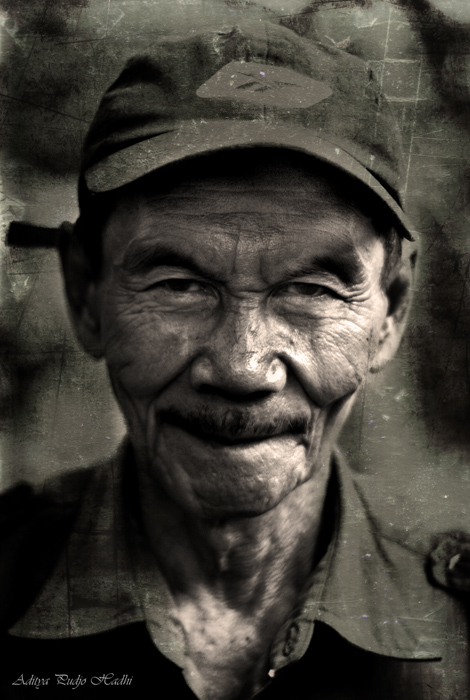
Nice shot with stylish overlaying textures! Love the "Hi i'm a photography & I've been stuck in a wet dusty drawer for a very long time" impression :D
Reply
:iconbittergrapes:
*BitterGrapes Aug 31, 2008  Professional Photographer
Good portrait and exceptional post-processing.
Reply
:iconwendy-ts:
Very impressive photo!
But I can't recognize, what kind of texture did you use here? ;) Anyway, maybe it's your secret "know how")))
Reply
:iconadityapudjo:
i used 2 texture on this pic..:D
Reply
:iconwendy-ts:
hmm.. let me guess.. it's some kind of brushes? it doesn't look like you used filters)) anyway, I could be mistaken))
Reply
:iconadityapudjo:
no its not a brush..its my pic stock of texture,,:D
Reply
:iconwendy-ts:
oh... :D
I don't even know the differences between textures and brushes, it seems to me, that they have so much in common! maybe the main difference is that brush can process the small local area of the picture, and texture applies to the whole picture..
nevermind, I wrote so many words here, just forget about it! ;)
Reply
:iconadityapudjo:
oh its ok..i dont mind to talk about it..:D the brushes is the one on the photoshop..and texture is a picture too..you can put the texture layer on top of the photo layer on photoshop then reduce the opicity on the texture layer..you can erase the part that you dont want to be texturized with the eraser tool(do it on the textur layer)..there you go..sorry for my english btw..:D
Reply
:iconwendy-ts:
oh, you're unfair to yourself, your english is not so bad! at least, I understood all that you tell me about textures, it's use and stuff))). and thanks to you for your explanation! I'll always use textures in the future)). maybe my works wouldn't be so good as yours, but I'll try hard. so thanks a lot again ;)
(btw, I recently found in photoshop a lot of standart (default) textures, I don't like them, but maybe there's a lot of another in the Net ;) )
Reply
Add a Comment: